Last updated: August 26, 2026
Disclosure: We may earn a commission when you buy through links on this page. This does not change the price you pay or how we rank Ledger and Trezor.
Trezor is the better hardware wallet for users who value open-source transparency, Bitcoin-focused features, and flexible multi-share backups, while Ledger is better for mobile use, broader asset support, staking, and a larger app ecosystem.
There is no single winner for everyone, so your best choice mainly depends on what coins you own and how you plan to use the wallet…
| Your priority | Better choice |
|---|---|
| Bitcoin-only storage | Trezor |
| Open-source transparency | Trezor |
| Multi-share backup | Trezor |
| Altcoins and tokens | Ledger |
| Mobile/iPhone use | Ledger |
| NFTs/Web3 | Ledger |
| Staking | Ledger overall |
| Simple desktop Bitcoin use | Trezor |
| Large touchscreen | Depends on model |
| Best budget choice | Compare Safe 3 vs Nano S Plus |
In this hardware wallet Ledger vs Trezor comparison, I will cover everything from security features and supported coins to ease of use and price. Hence, you would have a clear idea in which terms Ledger is better than Trezor or vice versa.
Table of Contents
Crypto Ledger vs Trezor Hardware Wallets Comparison
| Criteria | Ledger (2026) | Trezor (2026) |
|---|---|---|
| Current lineup (main models) | Stax, Flex, Nano Gen5, Nano X, Nano S Plus | Safe 7, Safe 5, Safe 3, Model T, Model One |
| Price range (USD) | About $49 to $399 | About $59 to $279 (most regions) |
| Secure element approach | Yes (EAL5+/EAL6+) | Safe 3/5/7 use EAL6+ secure element; Model One/Model T use microcontrollers |
| “Transparent” secure element | No (uses certified SE, but not “transparent SE” positioning) | Yes on Safe 7 (TROPIC01 “transparent” secure element concept) |
| Firmware / code transparency | Closed-source | Fullu open-source |
| Anti-scam transaction UX | Clear Signing | Clear signing |
| Best screens available | E Ink touchscreens (Stax 3.7″ curved; Flex 2.84″; Gen5 2.8″) | Color touchscreens (Safe 7 ~2.5″; Safe 5 1.54″; Model T 1.54″) |
| Bluetooth support | Yes on several models (Stax, Flex, Nano Gen5, Nano X) | Yes only on Safe 7 (Bluetooth 5.0+) |
| NFC support | Yes (notably Stax/Flex/Gen5) | No |
| Built-in battery | Yes on Stax/Flex/Gen5/Nano X (Nano S Plus has no battery) | Yes, only on Safe 7 (LiFePO4 battery) |
| Wireless charging | Yes on Stax (Qi) | Yes on Safe 7 (Qi2-compatible) |
| Mobile-first usability | Ledger Wallet app on iOS/Android | Limited for iOS users (best for Android) |
| Desktop app ecosystem | Yes | Yes (Trezor Suite) |
| Supported Coins | 15,000+ tokens, NFTs, and more | 9,000+ coins and NFTs |
| Third-party wallet compatibility | Strong (MetaMask and 50+ hot walles) | Yes |
| Staking | Yes | Limited only |
| DeFi / dApp flows | Very strong via app | Via third-party wallets only |
| Backup standard focus | Standard 12-24 seed phrase; Ledger recovery key | SLIP39 / Shamir multi-share backups; 12-24 words |
| Passphrase and PIN | Yes | Yes |
| Authenticity checks | Ledger “Genuine Check” | Tamper-evident holographic seals |
Ok, now, before comparing hardware wallets Ledger vs Trezor in detail, let’s see their different models…
Note: Check out my list of the best cold storage wallets
Ledger Crypto Wallet Models
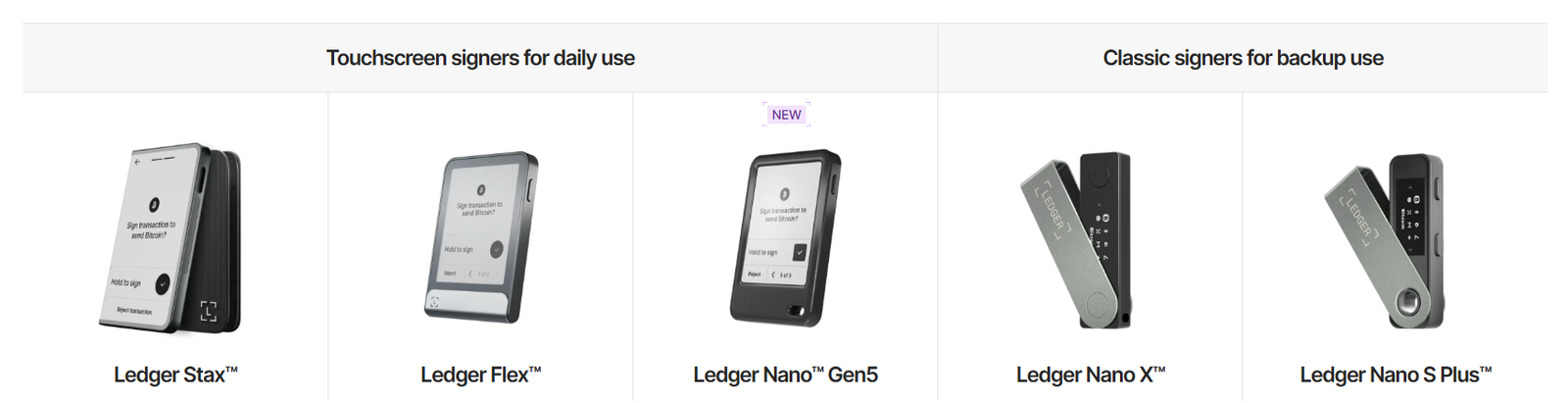
Ledger currently offers a range of 5 hardware wallet models, and each model has its own features and price point, so you can easily choose based on your budget and needs:
- Ledger Nano S Plus: This is Ledger’s basic model (an upgrade of the older Nano S). It’s a small USB stick with a tiny screen and two buttons. It has no Bluetooth or battery, so you need to connect it via USB only. Also, this device is strictly for desktop use or Android via an OTG cable; not for iOS users.
- Ledger Nano X: The Nano X adds Bluetooth, so you can use it wirelessly with your phone. It also has a tiny screen and two buttons (no touchscreen). The Nano X has a rechargeable battery as well (so you can use it on the go) and similarly can hold 100+ coin apps.
- Ledger Nano Gen5: The Nano Gen5 is the next generation of the Nano series (launched late 2025). It finally brings a touchscreen to the Nano, as it has a 2.8-inch E-Ink touch display (much bigger and easier to read than the old Nano X screen). It also includes Bluetooth and even NFC.
- Ledger Flex: The Flex is a mid-range touchscreen wallet introduced in 2024. The Flex does everything the Nano Gen5 can, but in a slightly different form factor; it’s a bit larger and designed with an E-Ink screen for low power usage. But, I didn’t find it much different from Gen5.
- Ledger Stax: This is Ledger’s flagship premium wallet. Ledger Stax was designed by Tony Fadell (of iPod fame), and it shows – it’s sleek and innovative. The Stax has a 3.7-inch curved E-Ink touchscreen that wraps slightly around the device, and it supports wireless Qi charging. It has magnets so you can stack multiple Staxes (hence the name) like a stack of books.
Now, all Ledger crypto devices run the same core software (Ledger Wallet) and security firmware, so yes, they all provide a similar level of asset protection. Hence, the differences are mostly in how you interact with them (screen, buttons vs touch, wireless or not). You can also read my full Ledger wallet review…
Here is a quick comparison between all Ledger hardware wallet models:
| Differential factor | Ledger Stax | Ledger Flex | Ledger Nano Gen5 | Ledger Nano X | Ledger Nano S Plus |
|---|---|---|---|---|---|
| Price (USD) | $399 | $249 | $179 | $119 | $49 |
| Screen type & size | 3.7″ curved E-Ink touchscreen | 2.84″ E-Ink touchscreen | 2.8″ E-Ink touchscreen | Small OLED (non-touch) | Small OLED (non-touch) |
| Resolution (px) | 400 × 670 | 480 × 600 | 300 × 400 | 128 × 64 | 128 × 64 |
| User input method | Full touchscreen | Full touchscreen | Full touchscreen | Physical buttons | Physical buttons |
| Connectivity options | USB-C, Bluetooth, NFC | USB-C, Bluetooth, NFC | USB-C, Bluetooth, NFC | USB-C, Bluetooth | USB-C only |
| Power & charging | Built-in battery + Qi wireless | Built-in battery (USB-C) | Built-in battery (USB-C) | Built-in battery (USB-C) | No battery (wired only) |
| Secure element & rating | ST33K1M5 – CC EAL6+ | ST33K1M5 – CC EAL6+ | Secure Element – CC EAL6+ | ST33J2M0 – CC EAL5+ | ST33K1M5 – CC EAL6+ |
| Advanced anti-scam protection | Full Clear Signing + Transaction Check | Full Clear Signing + Transaction Check | Full Clear Signing + Transaction Check | Partial clear signing only | Partial clear signing only |
Trezor Crypto Wallet Models
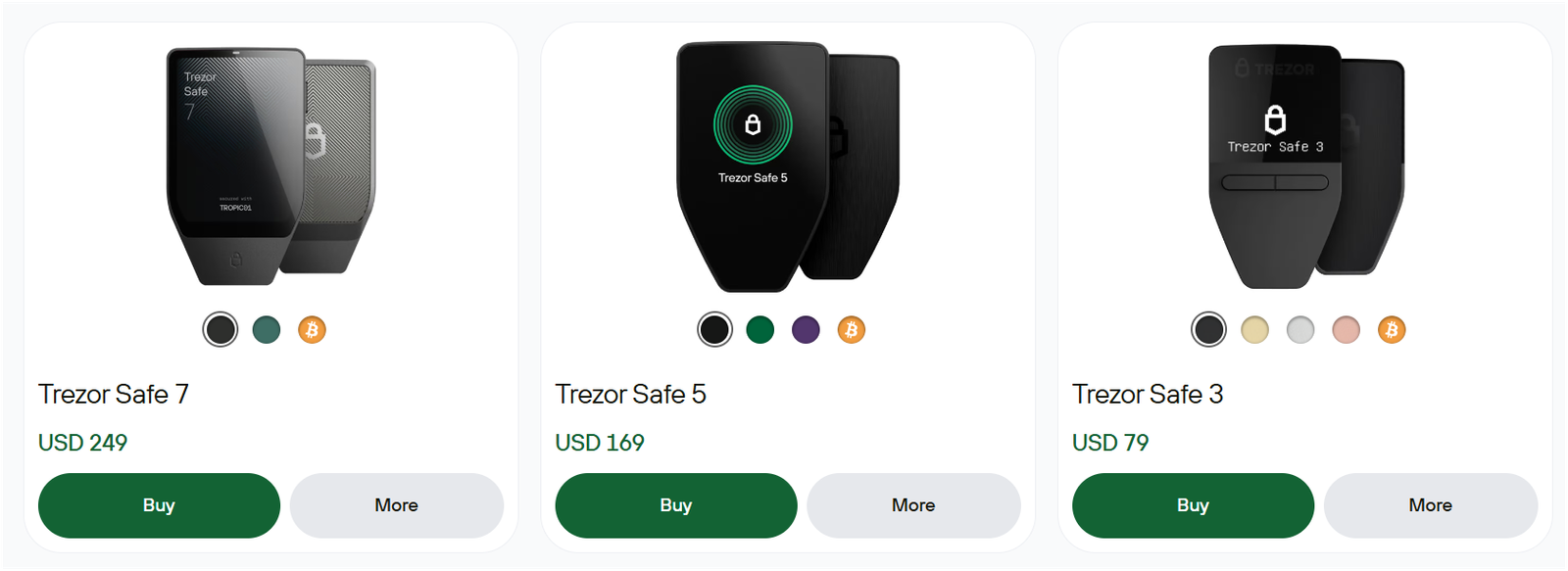
Trezor has its new lineup of 3 main models in the “Safe” series, plus it has its 2 older legacy models.
- Trezor Safe 3: The Safe 3 is the entry-level Trezor (launched in 2023, it’s the successor to the original Trezor One). It’s a compact device with a 0.96-inch monochrome OLED screen and two buttons. But here, unlike the old Model One, the Safe 3 actually includes a secure element chip (EAL6+ certified) for extra security.
- Trezor Safe 5: The Safe 5 is the mid-range model (launched 2024, succeeding the older Trezor Model T). It features a 1.54-inch color touchscreen with haptic feedback, so using it is very straightforward. Well, notably, it has a microSD card slot: you can use a microSD for things like storing encrypted backups or future security features.
- Trezor Safe 7: The Safe 7 is Trezor’s flagship model (released late 2025). It is packed with top-of-the-line features: a 2.5-inch color touchscreen (62% bigger than Safe 5’s screen, and very crisp), Bluetooth connectivity for wireless use, and even a built-in LiFePO4 battery so you can use it on the go. It’s the world’s first hardware wallet with a transparent Secure Element. The custom TROPIC01 chip that anyone can audit, plus an extra EAL6+ chip. It’s also marketed as “quantum-ready” because it uses post-quantum cryptography to secure firmware updates (preparing for future threats).
- Trezor Model One (Legacy): The Model One was Trezor’s original wallet (launched in 2014). It’s no longer the star, but it’s still out there as a basic option. It has two buttons and a small monochrome screen, similar in form to Safe 3 but without a secure element chip.
- Trezor Model T (Legacy): The Model T was Trezor’s premium touchscreen model released in 2018. It has a color touchscreen and a microSD slot. In many ways, the new Safe 5 and Safe 7 have taken over its role (Safe 5 is like an improved Model T at a lower price, and Safe 7 goes beyond). Trezor Model T might still be found with some vendors, but Trezor Safe 5 is the better buy now.
All Trezor models work with the Trezor Suite app, and they share the same core software features and coin support (with minor differences in which device can handle certain newer coins due to memory). The Safe 7 stands out by bringing Trezor up to parity or beyond Ledger in many areas: finally adding Bluetooth, a large screen, quantim-ready, and even some industry-first security measures. Meanwhile, Safe 3 and 5 ensure there’s a Trezor for every budget.
Here’s a quick Trezor wallets comparison: Trezor Safe 7 vs Safe 5 vs Safe3 vs Model One vs Model T
| Differential factor | Trezor Safe 7 | Trezor Safe 5 | Trezor Safe 3 | Trezor Model T | Trezor Model One |
|---|---|---|---|---|---|
| Price (USD) | $279 | $169 | $79 | $149 | $59 |
| Screen type & size | Large color touchscreen (~2.5″) | 1.54″ color touchscreen | Small OLED (non-touch) | 1.54″ color touchscreen | Small OLED (non-touch) |
| User input method | Full touchscreen + haptics | Full touchscreen | Physical buttons | Full touchscreen | Physical buttons |
| Connectivity | USB-C + Bluetooth | USB-C only | USB-C only | USB-C only | Micro-USB |
| Battery / wireless use | Built-in battery (mobile use) | No battery (wired only) | No battery (wired only) | No battery (wired only) | No battery (wired only) |
| Secure element design | Dual secure elements (Tropic-based + EAL6+) | EAL6+ secure element | EAL6+ secure element | No secure element | No secure element |
| Seed & backup options | 20-word default + SLIP39 multi-share | 12/20/24-word + SLIP39 | 12/20/24-word + SLIP39 | 12/24-word + SLIP39 | 24-word BIP39 only |
Ledger vs Trezor: Security Measures Comparing
Ok, it’s time for comparing hardware wallets Ledger vs Trezor based on their security measures, as it is the most important criterion. So, is Ledger safer than Trezor?; OR is Trezor more secure than Ledger? Let’s compare…
| Security Feature | Ledger Security Architecture | Trezor Security Architecture |
|---|---|---|
| Chip Type | ST33 Secure Element (EAL 5+/6+) | Optiga Trust M (EAL 6+) on Safe Models |
| Firmware Transparency | Closed Source (Audited internally/partners) | 100% Open Source (Community Audited) |
| Operating System | BOLOS (Isolates apps from each other) | Trezor Core (Monolithic architecture) |
| Physical Attack Resistance | Extremely High (Rated for high voltage/laser) | High (Improved significantly with SE chip) |
| Supply Chain Protection | Cryptographic attestation check on startup | Holographic tamper-evident seals on the box |
| Backup Standard | BIP-39 (24 words) + Optional Cloud Recover | BIP-39 (12/24 words) + SLIP-39 (Shamir) |
| PIN Protection | Wipes device after 3 failed attempts | Exponential time delay after failed attempts |
| Passphrase | Yes | Yes |
| Certification Level | ANSSI (French Cybersec Agency) Certified | CE and RoHS Certified |
| Privacy Features | No (Collects some metadata) | Advanced (Tor support) |
Here’s a more advanced Ledger vs Trezor hardware wallets comparison based on their security measures…
Part 1: Secure Element vs Open Security
Ledger has long used a Secure Element (SE) chip in its devices. Well, this is like a banking-grade secure chip (similar to what’s in your credit card or passport), which is designed to resist physical hacking attempts. Ledger’s SE chips are certified (EAL5+ or EAL6+), meaning they’ve been tested against a high standard.
But again, the downside is that the chip’s design and Ledger’s firmware are closed-source. So, you need to trust Ledger’s design and external audits for security.
Now, Trezor historically did not include a secure element in its early models (Model One and Model T) because the company wanted everything open-source and transparent (most SE chips came with NDAs and closed data).
However, the new Trezor Safe series (Safe 3, 5, 7) does include secure element chips, and importantly, they found a way to keep them open-source.
The Safe 7’s “TROPIC01” secure element is the world’s first auditable SE chip for consumers: its design can be reviewed by independent experts. Safe 3 and 5 also use an EAL6+ chip that is “NDA-free”, meaning Trezor can share details about how it works.
So, Trezor has caught up in physical security, even surpassing Ledger in the transparency of the secure element.
Part 2: Firmware Security
Ledger wallets basically run on a proprietary operating system (BOLOS), and only approved firmware can run on a Ledger; the device will refuse to load any unsigned code. So, yes, this is a good defense against malware, but it also means you can’t install custom firmware.
Trezor devices run fully open-source firmware. You could actually compile and install your own firmware if you wanted (Trezor devices have a mode to allow unsigned firmware, for advanced users).
From a security perspective, both have mechanisms to prevent unauthorized firmware (Trezor uses a bootloader check and shows a warning if the firmware isn’t official).
Also, I would prefer Trezor here because the code is open for audit, so more eyes to catch any bugs or backdoors. Ledger says its closed firmware is heavily vetted by its internal security team (“Ledger Donjon”) and outside experts, but of course, regular users must take their word for it.
Part 3: User Authentication
Both Ledger and Trezor use a PIN code to access the device, and after a few incorrect PIN guesses, the devices will actually wipe (to prevent brute-force attempts).
You need to set this PIN when initializing the device. Trezor allows PIN entry via touchscreen on Safe 5/7, or via a randomized keypad on the computer for Safe 3/Model One. Ledger’s touchscreen devices (Stax, Gen5, Flex) let you tap in your PIN; on Nano X/S, you have to click the buttons to input digits.
So, security-wise, I would say both are strong in this part (no PIN = no access).
Part 4: Seed Backup and Recovery
You know, the security of your hardware wallet mostly depends on how you back up your recovery phrase. Obviously, both Ledger and Trezor provide recovery seed words (typically 24 words) that you must keep safe.
Trezor has an advanced option called “Shamir Secret Sharing “(available in Safe 5 and 7). Here, you can split your seed into, say, 3-of-5 shards – so even if one backup is found, it’s useless without the others.
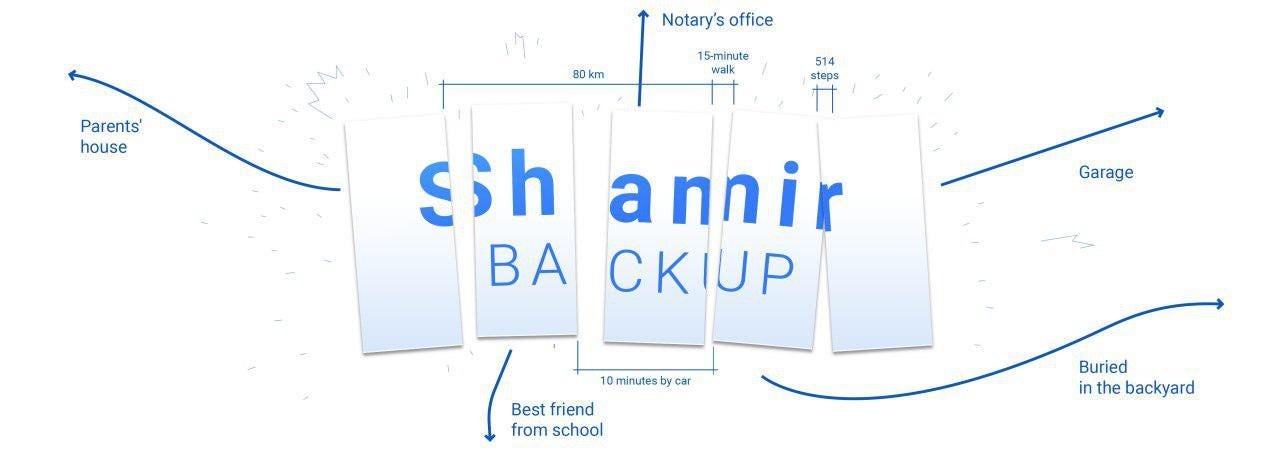
Ledger doesn’t support Shamir; they stick to one set of words. Ledger did introduce Ledger Recover (a service to split and encrypt your seed and store it with 3 companies) – but that caused a huge outcry, as many felt it undermined the idea of a hardware wallet.
Today, Ledger Recover is opt-in (you don’t have to use it, and frankly, most users don’t). Also, from a pure security standpoint, many users trust no online/cloud backup at all.
So, if you want a multi-part backup solution, Trezor offers it natively (Shamir), whereas Ledger’s solution involves trusting third parties (most privacy-conscious folks avoid that).
Read more: Best Ledger alternatives
Is Trezor safer than Ledger?
Well, you might be wondering, “So, is Trezor safer to use than Ledger?” Honestly, both cold wallets are extremely safe when used properly.
I would give a slight edge to Trezor due to its open-source approach, but again, for average users, both are highly secure. So, Trezor is safer than Ledger in terms of transparency and trust, allowing you to verify exactly what the code is doing, whereas Ledger requires blind trust in their firmware developers.
Ledger devices have never been hacked remotely. Your coins on a Ledger are safe unless you reveal your recovery phrase or physically hand someone your unlocked device. The secure element and Ledger’s OS do a great job protecting against malware and physical intrusion. Similarly, Trezor devices also have a stellar security record, and with the new Safe models including secure elements, the old physical attack concerns have been largely addressed.
Ledger vs Trezor Security Incidents
Now, one aspect to consider is how each handled security controversies, and Ledger has a few issues in that area:
- In 2020, Ledger’s e-commerce database was breached (user contact info leaked, not keys). Well, that was not a breach of the wallet security itself; it’s about data handling. Trezor also faced this data breach recently in 2026.
- In 2023, Ledger announced Ledger Recover (as discussed), which theoretically, if compromised, could expose user seeds (since shards of your seed would be stored online). But, after community backlash, Ledger paused automatically rolling out that service. Trezor, by contrast, has stuck to the mantra “not your keys, not your coins, keep your own backup” with solutions like Shamir that involve no third-party.
- For Ledger, the 2026 Zilliqa incident involved a flaw in the legacy Zilliqa Ledger application that could leak enough signing information across repeated transactions to reconstruct affected keys. Zilliqa’s August 2026 incident page reported thousands of exposed accounts and substantial proven theft, while distinguishing the application flaw from a compromise of Ledger’s hardware architecture as a whole.
- For Trezor, Ledger Donjon disclosed a laser fault-injection vulnerability affecting the TROPIC01 secure element in early 2026. Trezor says the issue does not by itself defeat the Safe 7’s complete layered security architecture.
Trezor vs Ledger Supported Coins
Ledger wallet can manage over 15,000 coins and tokens directly in the app, meaning you just plug it in, add the account, and you are done.
Trezor supports a huge number of coins too (over 9,000 nominally), but the catch is that many of them are not supported in “Trezor Suite” and require you to connect to a third-party wallet like Exodus or MetaMask. Like, for a long time, managing Solana on Trezor was a headache, and while they fixed that, Ledger is always faster to add support for new trending Layer 1 networks.
Now, here are some notable differences between Ledger vs Trezor based on supported coins:
- Cardano (ADA): Ledger supports ADA (you can manage Cardano in Ledger Wallet app now, and stake it). Trezor also supports Cardano, but as of now, you need to manage it via third-party wallet (like AdaLite or an integration in Trezor Suite with a partner).
- Polkadot (DOT) & Kusama: Ledger supports DOT and KSM fully (Ledger app). Trezor crypto wallet currently does not support Polkadot/Kusama at all.
- Solana (SOL): Ledger supports Solana (you can use Ledger with Phantom wallet, etc., and even see your SOL account in Ledger Wallet for balance). Trezor added SOL support for the Safe 5 and 7 (not on the older Model One). You can manage SOL via a third-party (Solflare or similar). So SOL is supported on newer Trezors, but not on Model One.
- Cosmos (ATOM): Ledger supports Cosmos (including staking ATOM in Ledger Wallet). Trezor does not currently support Cosmos coins.
- Tron (TRX): Ledger supports Tron and TRC-20 tokens (through Ledger Wallet or TronLink), whereas the Trezor wallet does not support Tron at this time.
- NFTs: Ledger Wallet app displays NFTs (on Ethereum, Polygon) natively. Trezor Suite does not have an NFT interface, but you can still hold the NFTs in your Ethereum account and view/manage them with a third-party (like connecting your Trezor to MetaMask).
Here is a more useful look at the main cryptocurrencies and networks:
| Coin or Network | Ledger | Trezor | How You Manage It |
|---|---|---|---|
| Bitcoin (BTC) | Yes | Yes | Native support on both |
| Ethereum (ETH) | Yes | Yes | Native support on both |
| ERC-20 tokens | Yes | Yes | Native Ethereum token support |
| Solana (SOL) | Yes | Yes* | Ledger Wallet and Trezor Suite |
| Cardano (ADA) | Yes | Yes* | Ledger Wallet and Trezor Suite |
| XRP | Yes | Yes* | Native support on both |
| BNB Smart Chain | Yes | Yes | Supported on both |
| Polygon | Yes | Yes | Supported on both |
| Avalanche C-Chain | Yes | Yes | Supported on both |
| TRON (TRX) | Yes | Yes* | Supported through their main wallet apps |
| Dogecoin (DOGE) | Yes | Yes | Native support on both |
| Litecoin (LTC) | Yes | Yes | Native support on both |
| Stellar (XLM) | Yes | Yes | Supported on both |
| Cosmos (ATOM) | Yes | Yes | Ledger Wallet on Ledger; third-party wallet needed with Trezor |
| Monero (XMR) | Supported through compatible wallets | Yes* | Third-party wallet required |
One more thing: Trezor is especially popular in the Bitcoin community. Basically, if you are Bitcoin-maxi (you primarily hold BTC and maybe some ERC-20 stablecoins), Trezor is often recommended because of its focus on BTC features (like coin control and being open-source). Ledger, of course, supports Bitcoin flawlessly too, but Trezor tailors a bit more to BTC enthusiasts in their software. Even Trezor also offers BTC-only firmware hardware wallets; no altcoins. You can also check out my list of the best multi-currency hardware wallets.
Ledger vs Trezor supported coins (winner): Ledger has broader support for more different blockchains. Trezor covers all the major ones but has a few gaps (no native Polkadot, Cosmos, Tron, Algorand, etc.). But again, if your portfolio is mostly Bitcoin, Ethereum, and a mix of popular altcoins, you’ll be fine with either.
Ledger vs Trezor Wallet: Pricing (Value for Money)
The cheapest option used to be the Trezor Model One, but today, it is outdated, so the real battle is now between the Ledger Nano S Plus ($49) and the Trezor Safe 3 ($59). Honestly, they are neck and neck, but the Nano S Plus offers a slightly better screen resolution for reading addresses, while the Trezor Safe 3 offers the peace of mind of open-source code.
Now, moving up to the mid-range, the Ledger Nano Gen5 ($179) offers significantly more value than the Trezor Safe 5 ($169) because you get Bluetooth connectivity and a battery, which the Safe 5 completely lacks.
| Model Tier | Ledger Model & Price | Trezor Model & Price |
|---|---|---|
| Entry Level | Nano S Plus ($49) | Model One ($59) |
| Mid Range | Nano X ($119) | Model T ($149) |
| Advanced | Nano Gen5 ($179) | Safe 3 ($79) |
| High End | Flex ($249) | Safe 5 ($169) |
| Luxury | Stax ($399) | Safe 5 ($279) |
Winner: Ledger is better than Trezor in terms of value for money due to including batteries and Bluetooth connectivity in their mid-range devices, features that Trezor charges a premium for or omits entirely.
Trezor vs Ledger for NFTs
Ledger is way ahead here because they have built their entire new ecosystem around the visual aspect of digital ownership. In Ledger Wallet, you can actually see your NFTs in a beautiful gallery view, and on the Stax and Flex, you can display them on the E Ink screen even when the device is off.
Ledger Wallet app supports viewing and managing NFTs on Ethereum and Polygon networks natively. You can actually see your ERC-721 and ERC-1155 tokens (NFTs) right in the app: often with the image, name, and collection details.
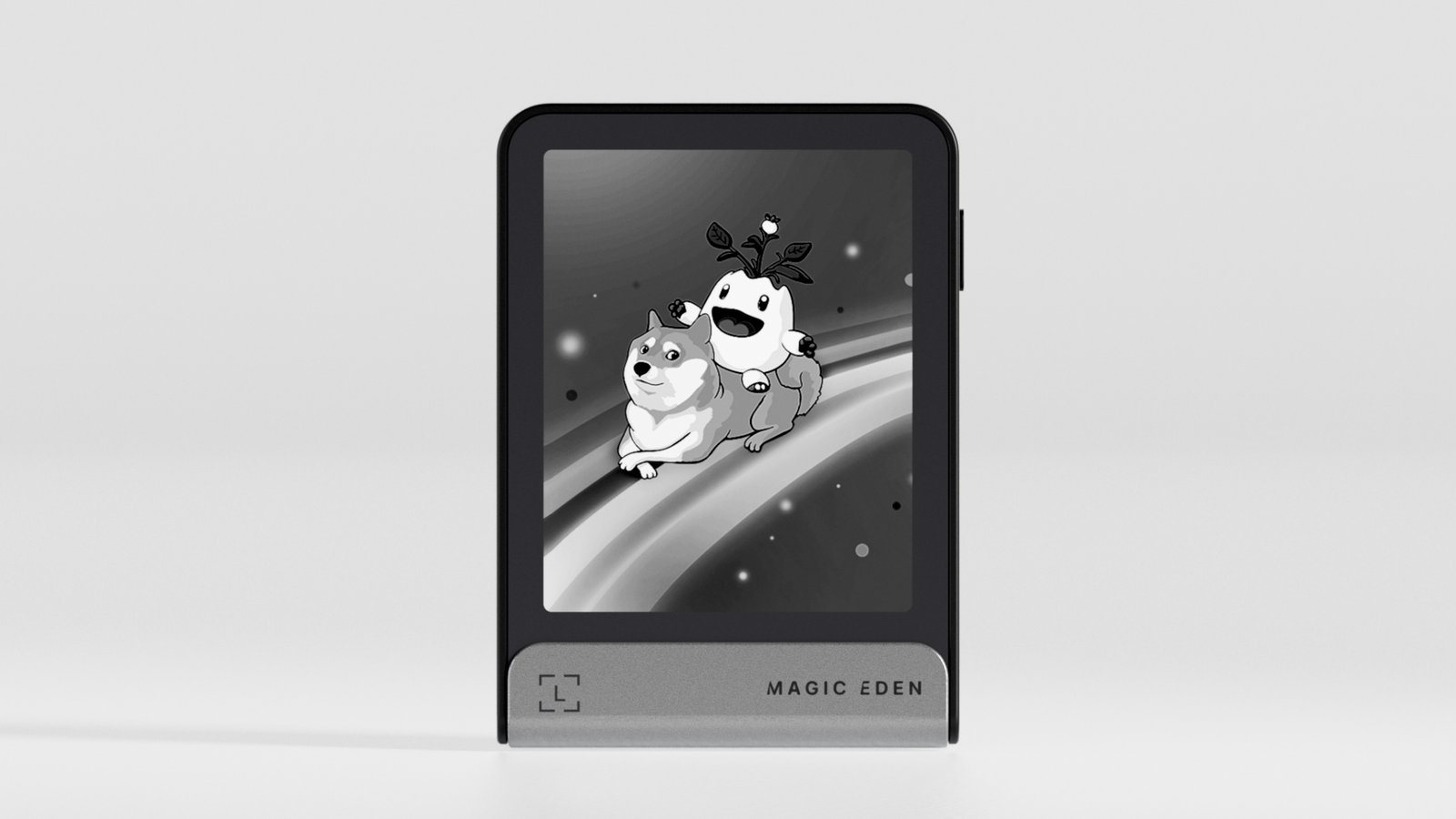
Also, Ledger Wallet will even show the NFT’s info, and the Ledger hardware will display a clear signing message (e.g., “Transfer NFT: CryptoPunk #1234 to address XYZ…”).
Trezor is kind of behind in this specific area; while you can store the keys for your NFTs securely, you can’t really view the artwork nicely in Trezor Suite and usually have to connect to OpenSea.
Also read my guide on the best hardware wallets for NFTs…
So, Ledger vs Trezor for NFTs (Winner): Ledger is better than Trezor in terms of NFT management due to its visual-first approach and the ability to display artwork directly on the device screens of the Stax and Flex.
Trezor vs Ledger Wallet: Ease of use
1. Device Setup & Initialization: You see, setting up these devices is actually pretty friendly for most people because both Ledger Wallet and Trezor Suite show you exactly what to do with on-screen prompts. Honestly, Trezor is slightly better. It is plug-and-play because you don’t have to install separate apps for coins, which is nice.
Ledger is easy too, but it makes you install an “app” for every coin you want to use, and some beginners get confused and ask, “Why do I need to install an app just for Bitcoin?”
2. Using the Desktop/Mobile App: Ledger Wallet is packed with features and feels almost like a mini-exchange platform right inside your wallet. You have tabs for your portfolio, a “Discover” section for DeFi apps, and swap options, which is convenient because you can do everything in one place. But it can feel like clutter if you just want to send Bitcoin and be done.
Trezor Suite is much cleaner and more focused because you just have a sidebar with Accounts, Send, Receive, and Trade. The design is very straightforward and doesn’t overwhelm you, though you can dig for advanced settings like Tor or coin control if you want.
3. Transaction experience: Well, on Ledger Wallet, when you send a transaction, it’s pretty user-friendly: you choose the asset, paste address, set amount/fee, click send. The device then prompts you to verify details. On Trezor Suite, it’s similar: fill out send form, and you’ll get a prompt on device.
4. Multitasking and App Limits: You see, people used to have to worry about space on old Ledger devices like the original Nano S, which could only hold like three apps at once. Yes, that was truly annoying, but the new Nano S Plus and Nano X have tons of memory and can install over 100 apps now. So, the “app management” headache is mostly gone, but you still have to understand the concept. But again, on Trezor, you just don’t worry about apps at all because all supported coins just work as long as the firmware is updated.
Winner: On ease here, Trezor is a bit simpler to use than Ledger: just plug it in, and any coin listed is already usable without installing anything. It’s a small difference, but it exists.
Trezor Suite vs Ledger Wallet: Mobile App Compared
Ledger Wallet on mobile (iOS and Android) is fantastic because the Bluetooth functionality in the Nano X, Gen5, Flex, and Stax allows for a completely wireless experience with iPhones. You can sign transactions, swap tokens, and check balances without cables everywhere.
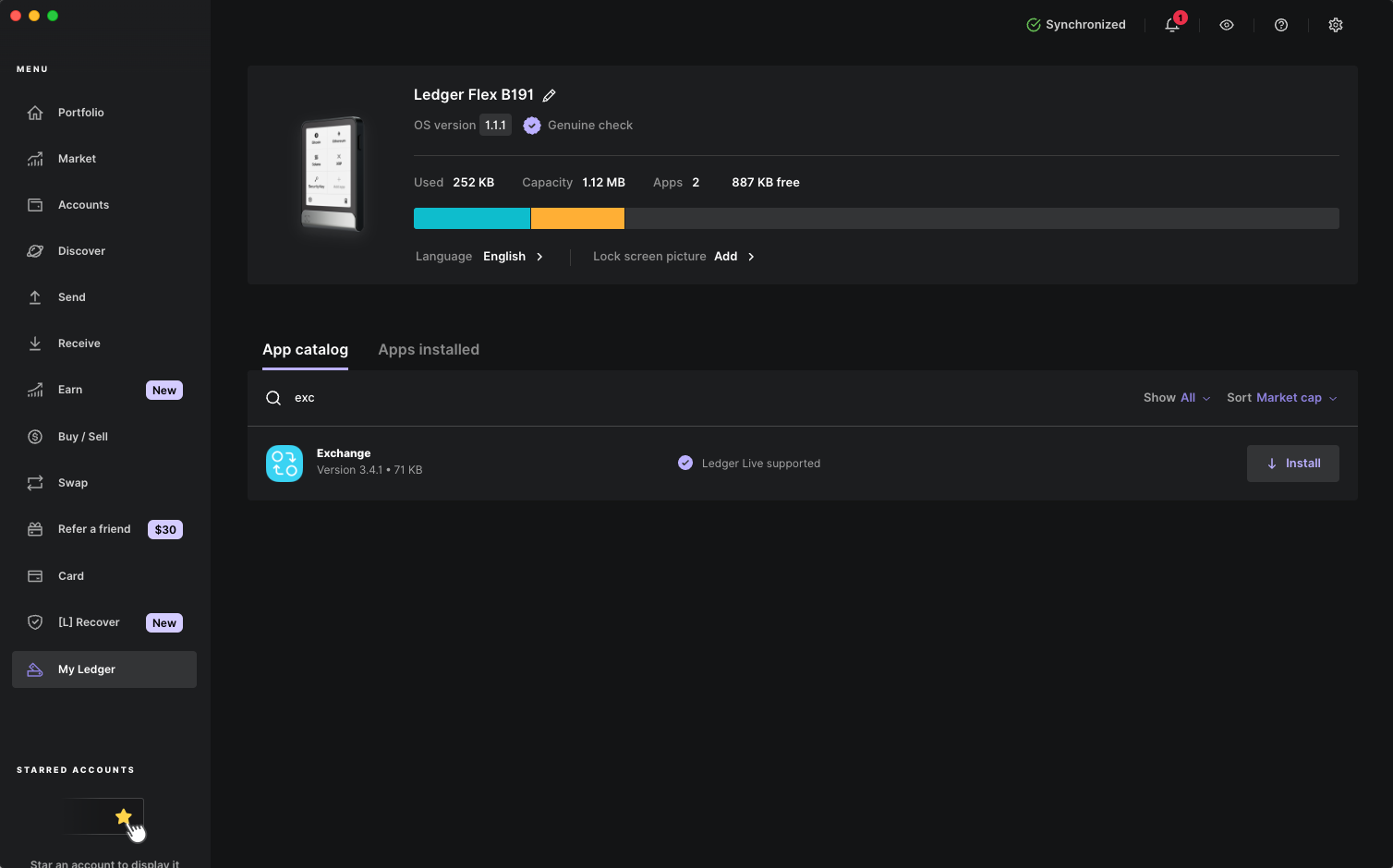
Trezor has struggled here historically; while they now have “Trezor Suite Lite,” the iOS experience is severely limited due to Apple’s USB restrictions, and only the expensive Safe 7 offers Bluetooth to bypass this.
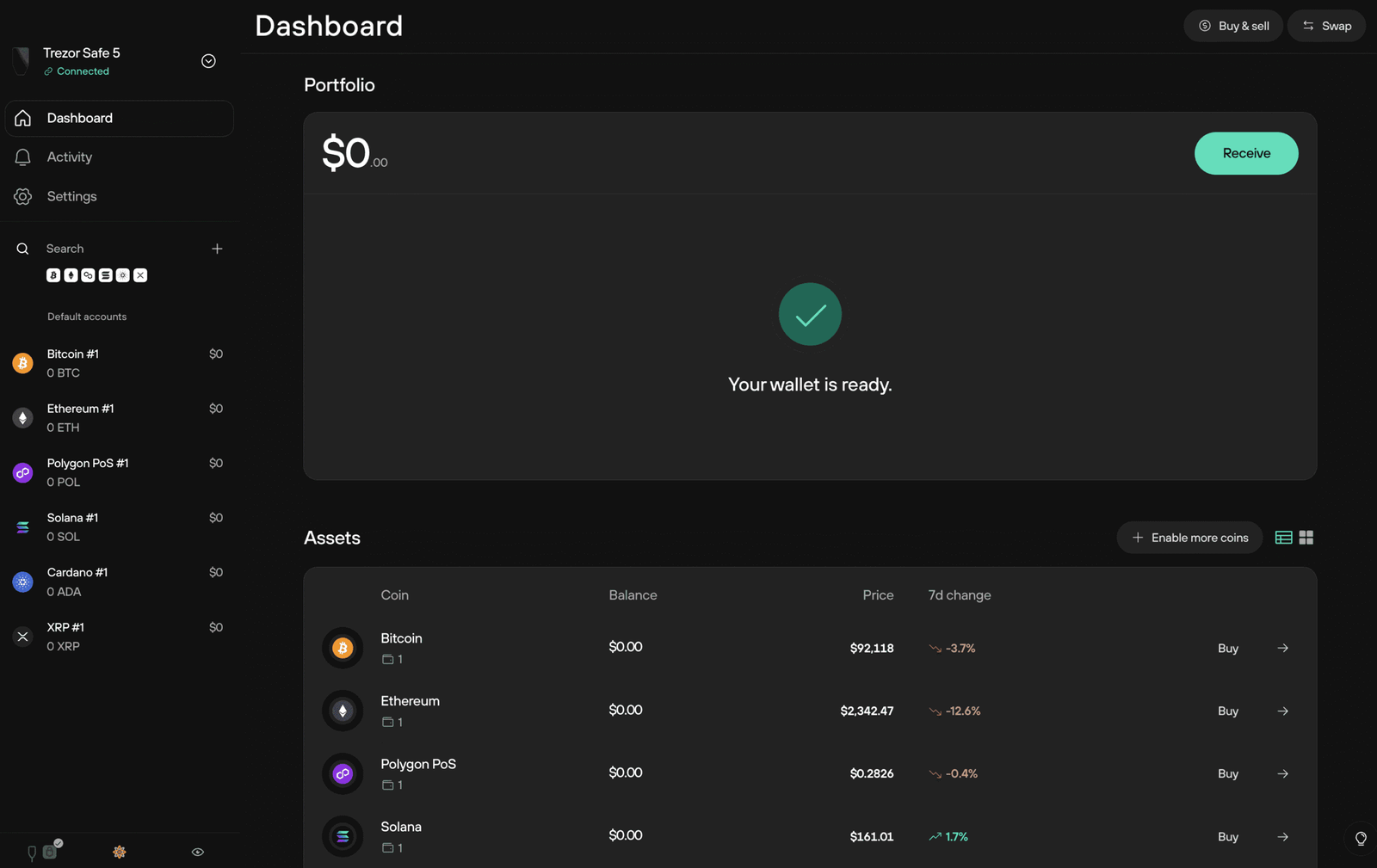
App reliability: Ledger Wallet has had years of refinement on mobile, and generally, it’s stable. Trezor’s new app might have some early hiccups, but should be fine for basic tasks.
So, Trezor Suite vs Ledger Wallet (Winner): Ledger is the clear winner right now. And, if you’re an iPhone user, a Ledger Nano X/Gen5/Stax is ready to use, whereas a Trezor (even Safe 7) might not have an official iOS solution at this moment.
Ledger vs Trezor: Customer Support & Resources
Both companies have huge online libraries of guides and articles, with Ledger having their “Academy” and Trezor having a massive “Wiki” that covers almost everything. Generally, you won’t need support because these devices just work day-to-day.
But again, if you do need help, the community on Reddit is usually faster than official support for both brands.
Also, one thing you should know is that Ledger had a data leak a while ago. Some users got scam emails pretending to be Ledger support, which was pretty scary for them. You just have to be careful and remember that nobody official will ever ask for your 12-24 words.
Trezor has a good reputation and hasn’t had that specific problem, but since they are a smaller company, one-on-one replies might not be lightning fast either.
Ledger Wallet vs Trezor Wallet Models Comparison
Ledger Flex vs. Trezor Safe 5 vs. Ledger Stax vs. Trezor Safe 7
The Ledger Flex and Stax differ largely in form factor; the Stax is a luxury flex with its curved screen, while the Flex is a more practical, wallet-friendly square. The Trezor Safe 7 is the only Trezor that truly competes here, offering the durability of aluminum and the convenience of Bluetooth.
So, if you care about battery life and reading in sunlight, the E Ink on the Ledger models is superior. However, if you want a color interface and haptic feedback, the Trezor Safe 5 or 7 feels more responsive.
Okay, here is the comparison table: High-End Flagships…
| Feature | Ledger Flex | Trezor Safe 5 | Ledger Stax | Trezor Safe 7 |
|---|---|---|---|---|
| Price | $249 | $169 | $399 | $279 |
| Screen Tech | E Ink (Grayscale) | Color LCD | E Ink (Grayscale) | Color LCD |
| Screen Size | 2.8 inch | 1.54 inch | 3.7 inch (Curved) | 2.4 inch |
| Touchscreen | Yes | Yes | Yes | Yes |
| Battery | Weeks (Standby) | None (Wired) | Months (Standby) | Days |
| Bluetooth | Yes (iOS/Android) | No | Yes (iOS/Android) | Yes |
| Wireless Charge | Yes (Qi) | No | Yes (Qi) | Yes (Qi) |
| Material | Aluminum/Glass | Plastic/Glass | Aluminum/Magnet | Aluminum |
| NFC | Yes | No | Yes | No |
| Secure Chip | EAL 6+ | EAL 6+ | EAL 6+ | Dual Chip |
| Thickness | Very Thin | Standard | Standard | Thick/Robust |
| NFT Display | Lockscreen | No | Spine & Lockscreen | No |
Ledger Nano Gen5 vs. Trezor Safe 3 vs. Ledger Nano X
The Ledger Nano Gen5 is technically superior to the Nano X, offering a touchscreen and NFC for only a small price increase, making the Nano X somewhat obsolete unless you find it on sale.
The Trezor Safe 3 punches way above its weight class; despite being much cheaper, it offers equal security, but it lacks the convenience of Bluetooth and a touchscreen. Hence, I would say, if you hate typing PINs with two buttons, the Nano Gen5 is the clear winner here.
| Feature | Ledger Nano Gen5 | Trezor Safe 3 | Ledger Nano X |
|---|---|---|---|
| Price | $179 | $79 | $119-$149 |
| Interface | Touchscreen (E Ink) | 2 Buttons | 2 Buttons |
| Bluetooth | Yes | No | Yes |
| Battery | Yes | No | Yes |
| Secure Chip | EAL 6+ | EAL 6+ | EAL 5+ |
| Coin Support | 5,500+ Native | 9,000+ (Mixed) | 5,500+ Native |
| Screen Info | Full Details | Scroll Required | Scroll Required |
| Mobile Use | Excellent | Android Only | Excellent |
| NFC | Yes | No | No |
| Pin Entry | On Screen | 2-Button Shuffle | 2-Button Shuffle |
Which is easiest to use? Ledger Nano Gen5 is the easiest among these three because of the touchscreen and connectivity. The Trezor Safe 3 is easy for basic tasks, but anything requiring text input will push you to use the computer app to type (which Trezor at least does in a secure way for PIN).
Trezor Model One vs Ledger Nano S Plus
The Ledger Nano S Plus is objectively the better piece of hardware; it has a secure chip, supports more coins like XRP and Cardano natively, and uses a modern USB-C connector.
The Trezor Model One is showing its age with the Micro-USB port and lack of native support for major altcoins. So, unless you are strictly Bitcoin-only and on a tight budget, the Nano S Plus is absolutely worth it for the future-proofing.
| Feature | Trezor Model One | Ledger Nano S Plus |
|---|---|---|
| Price | $49 | $59 |
| Connector | Micro-USB (Old) | USB-C (Modern) |
| Secure Chip | No (Software only) | Yes (EAL 5+) |
| Coin Support | Limited (No XRP/ADA) | Full (All coins) |
| Screen | Tiny Monochrome | Sharp OLED |
| Build | Cheap Plastic | Plastic + Metal Shield |
| Setup | Web Browser | Desktop App |
| iOS Support | No | No |
| Passphrase | Computer Entry (Risk) | Device Entry (Safe) |
| Safety | Good | Excellent |
Conclusion
To sum up my crypto Ledger vs Trezor best hardware wallets comparison, honestly, both companies make amazing crypto cold storage solutions, and you really can’t go wrong with either if your primary goal is simply “don’t get hacked.”
But here is my final take…
If you are a mobile-first person, like you mostly use phone and have an iPhone, Ledger is the only real choice because the Bluetooth integration is just too seamless to ignore. Trezor is too limited in this case. The new Ledger Nano Gen5 is probably best for price and features.
Now, if you need privacy features like Tor, or need a BTC-only wallet, or you just hate the idea of closed-source software, Trezor is the best hardware wallet. The Trezor Safe 3 is the best value wallet on the market. And the Safe 7 is a beast if you want top-tier specs and that satisfying aluminum build.
| Choose | Best reason |
|---|---|
| Trezor Safe 3 | Affordable security + open-source approach + Bitcoin |
| Trezor Safe 5 | Touchscreen Trezor experience |
| Trezor Safe 7 | Premium Trezor + wireless + layered secure elements |
| Ledger Nano S Plus | Budget Ledger ecosystem |
| Ledger Nano Gen5 | Modern Ledger features/value |
| Ledger Flex | Large touchscreen + mobile |
| Ledger Stax | Premium design/display |
FAQs
What is the difference between Trezor and Ledger?
The main difference is that the Trezor wallets are completely open-source. Their hardware and software can be audited by anyone, while Ledger wallets use a closed-source secure chip and proprietary firmware.
Plus, Ledger focuses heavily on mobile connectivity with Bluetooth, while Trezor has historically prioritized desktop usage and privacy features like the Tor browser for IP hiding.
Which is the better hardware wallet in 2026, Ledger or Trezor?
Ledger is slightly better because it offers a more versatile ecosystem with superior mobile app support and native compatibility with a wider range of coins and NFTs.
But again, for security purists and Bitcoin-focused users, Trezor is often considered better because its open-source nature aligns more closely with the ethos of cryptocurrency. The specific “best” model this year is likely the Ledger Nano Gen5 for features or the Trezor Safe 3 for pure value.
Why is Trezor more anonymous than Ledger?
Trezor is considered more anonymous because it integrates advanced privacy tools like Tor and CoinJoin directly into the Trezor Suite software, making it easier to mask your IP address and mix your coins.
Ledger Live collects some standard operational data (though it can be minimized), and their optional “Ledger Recover” service requires full KYC identity verification (it is obviously optional).
Is Trezor better than Ledger?
Trezor is not objectively “better” in every category, but it is definitely better for users who prioritize open-source software and desktop-based management.
However, Ledger is “better” for users who want to engage with DeFi, NFTs, and manage their portfolio on iOS devices due to its superior connectivity and app ecosystem.
How I Tested Ledger and Trezor Hardware Wallets
I tested Ledger and Trezor wallets by using them the same way a normal crypto holder would use a hardware wallet. I did not rank them only by reading product pages or comparing technical specs. I looked at the full experience, including setup, wallet recovery, transaction signing, software, mobile support, security features, and daily use.
I first checked how easy it was to set up each wallet from a new device. I looked at the number of setup steps, PIN creation, backup options, and how clearly each wallet explained the recovery process. I also checked how easy it was to verify the recovery words and understand the security warnings shown during setup.
Next, I tested the main wallet apps. Ledger uses Ledger Wallet, while Trezor uses Trezor Suite. I checked how easy it was to add accounts, receive crypto, send transactions, check balances, and manage supported coins. I also paid attention to how much transaction information each device showed on its own screen before I approved a payment.
Security was another major part of my testing. I compared the secure element design, PIN protection, passphrase support, recovery options, firmware updates, and what happens if someone gets physical access to the device. I also looked at how Ledger and Trezor handle transaction verification because a hardware wallet is only useful when you can clearly check what you are signing.
I tested mobile and desktop use separately as well. Ledger has a stronger mobile setup on supported models because of Bluetooth and wider smartphone support. Trezor mainly gives you a more traditional USB-based experience, although the exact connection options depend on the model you buy.
I also compared coin support based on real use rather than only the large numbers shown on product pages. I checked whether popular assets could be managed directly inside Ledger Wallet or Trezor Suite and whether you needed a third-party wallet for some networks.
Finally, I compared the price of each wallet with the features you actually get. A cheaper wallet is not automatically the better value, and the most expensive model does not make sense for every user. I ranked each device based on security, ease of use, supported assets, software experience, backup options, mobile support, and overall value.
The goal of my testing was simple: find out which wallet is better for different types of users instead of choosing one winner based on brand name alone.